New Business entity with new TIN
Register a new business branch from Settings → Add New Business. Use this when you created your account but did not finalise a business during signup, or when you are adding another business with its own number.
Before You Start
- A 10-digit TIN for the new business
- The business Name and registered Address
- The business Country to register under
Creating the Business
1. Open the Business settings
In Settings, choose Business Settings.
2. Start a new business
Click Add New Business (top-right of the Managed Businesses card).
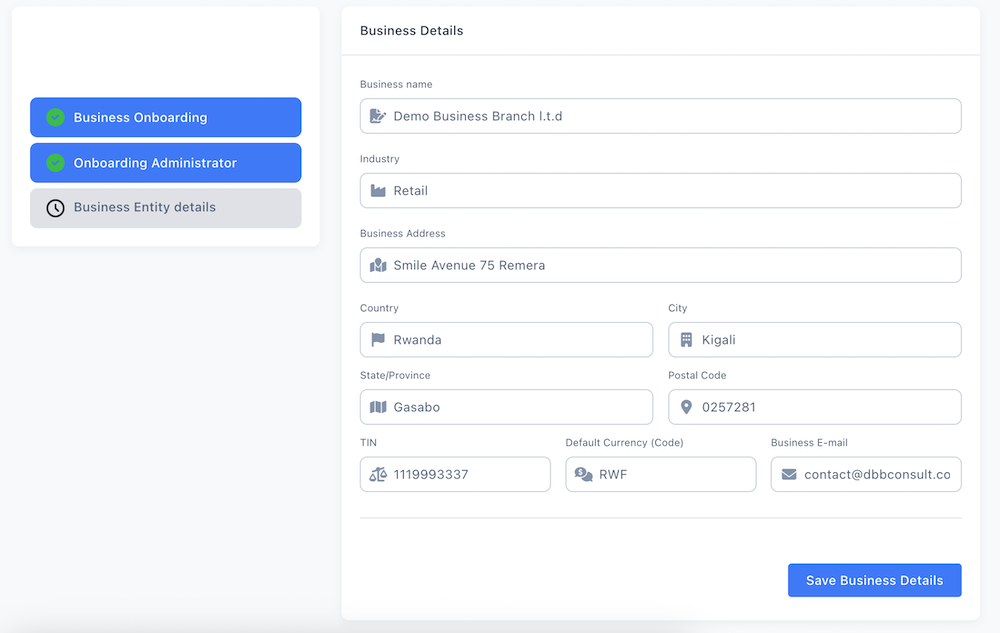
3. Complete the form
Identity & Business Details
| Field | Required | Description |
|---|---|---|
| Business Name | Yes | Official registered name; printed on the receipt |
| Industry | No | Business sector, e.g. Pharmacy, Retail |
| Address | Yes | Physical address where sales take place |
| Country | Yes | The country of registration |
| City | Recommended | City of the business |
| Postal Code / province | No | Country-specific locality fields |
| TIN (Business ID field) | Yes | The 10-digit registration number |
| Default Currency | Yes | RWF for Rwanda |
| Business E-mail | Recommended | Contact email for the branch |
The TIN cannot be updated once this business starts operating (after its first sales receipt is issued). Double-check the number now, a mistake cannot be corrected afterward.
4. Save the business
Click Save Business Details. Your new branch's first sale becomes its receipt number 1.
What Rexolia Does Automatically
| Action | Detail |
|---|---|
| Assigns you | The current user is assigned to the new entity |
| Billing | Anchors the subscription cycle if this is your first business |
| Modules | Enables the modules included in your plan |
Saving registers the entity only. Word on EBM/VSDC signing for the new branch: Activating EBM.
Important Notes
Readiness before selling Before the new branch can make compliant sales it needs its compliance set-up (Initial setups), an Active warehouse bound to it (Registering Warehouse), opening stock, and a healthy EBM/VSDC channel (RRA receipts & nil reporting).
Each entity keeps its own number and numbering Every business you register carries its own TIN and its own receipt sequence. Adding "another branch" that shares a single registration is not the same as adding a genuinely new business. If your structure is one head office with sub-locations under the same number, confirm with support how to reflect that.
Changed identity? If the business already exists and you need to change its identity (ownership transfer, merge, or a corrected TIN) rather than add a new one, follow Change of Business ID / Ownership.
Troubleshooting
The TIN field is not labelled "TIN" Set Country to Rwanda. Country selection controls both the field label and the tax handling applied.
A receipt was issued with a wrong TIN The TIN is locked once the first sale goes through and cannot be re-edited. Refer to Change of Business ID / Ownership.